


Your magazine cover is more than just the first page of your publication. It is the first impression readers get of your content. Today you can easily create magazine covers without having to spend anything. You can create a polished, custom cover in minutes without starting from scratch.
If you also want complete control over your images before adding headlines and layouts, then you need to check out Blend’s magazine cover maker. Both app and the website can make your workflow easier. Instead of spending hours editing photos in different applications, you can use AI to generate visuals, blur or unblur objects, improve colours, and prepare high-quality images before turning them into a magazine cover.
Without further ado, let’s take a look at how to make a magazine cover, what separates an average design from a professional one, and how Blend helps you create better-looking covers with far less effort.
What is an AI Magazine Cover Maker?
A magazine cover maker is an online design tool that helps you create customised magazine covers without needing professional graphic design experience.
Instead of working with complicated editing software, you can simply choose a layout, upload your images, customise the text, adjust colours, and export a high-resolution design that's ready for print or digital publishing.
Many online magazine cover makers also include AI features that generate original artwork from text prompts, helping you create unique covers instead of relying only on pre-made templates.
A good magazine cover maker lets you:
- Create magazine covers online
- Upload your own images
- Add custom headlines and text
- Use professional typography
- Remove or replace backgrounds
- Edit colours and layouts
- Export high-resolution files
- Design covers for both print and digital magazines
Whether you are creating a single cover or publishing magazines regularly, the right tool saves time while helping your designs look more professional.
RELATED READING: Spotify Playlist Cover Maker: Create Stunning Playlist Covers with AI
How to Create a Magazine Cover with Blend (Step-by-Step)
If you already have an idea for your magazine but aren't sure how to turn it into a professional design, Blend makes the process surprisingly simple. Instead of spending hours working with complex design software, you can describe your vision, generate artwork using AI, and refine every detail until it looks exactly how you imagined.
This approach is especially useful if you are creating magazine covers regularly and want something more original than a standard template.
Step 1: Open DesignGPT in Blend
Start by opening the Blend app and selecting DesignGPT from the home screen. DesignGPT allows you to create original designs using simple text prompts. You don't need graphic design experience, and you don't have to start with a blank canvas. Once inside DesignGPT, tap the Create anything prompt box.
You can describe the exact type of magazine cover you want.
For example:
Fashion magazine cover featuring a confident model wearing modern streetwear, luxury editorial styling, beige background, soft studio lighting and elegant serif typography.
Travel magazine cover showing a tropical island at sunrise with vibrant colours, cinematic lighting and premium magazine headlines.
Business magazine cover featuring a modern city skyline, clean layout, navy and white colour palette and professional editorial design.
The more detail you provide, the more accurate the final result will be.
Step 2: Describe your magazine cover
This is where you bring your vision to life. Instead of entering a basic prompt such as "create a magazine cover", describe the mood, colours, subject, typography and style. Write something like, “Create a premium fashion magazine cover featuring a female model in a white blazer, luxury editorial photography, soft shadows, minimal beige background, elegant serif typography and bold feature headlines.”
Blend understands natural language, so you can write prompts exactly as you would describe the design to a creative professional. After entering your prompt, tap the arrow to generate your magazine cover.
Step 3: Edit the design
Once your cover has been generated, you can personalise it further using Blend's editing tools. Tap Edit to access smart design controls. You can:
- Add or modify headlines
- Replace text
- Change objects
- Add design elements
- Remove distractions
- Adjust colours
- Refine the layout
For instance, if the generated cover includes a headline that doesn't fit your publication, you can instantly replace it with your own cover story. This gives you complete creative control without needing advanced editing skills.
Step 4: Refine everything with Assist
For additional customisation, use Blend's Assist feature. Simply type the changes you'd like to make, and Blend updates the design automatically. You can ask Assist to:
- Add new headlines
- Rewrite text
- Change the overall design style
- Modify colours
- Replace backgrounds
- Improve composition
- Adjust visual elements
You can continue refining the cover until every detail feels right. Once you are happy with the result, download the final design in high resolution and use it for print publications, digital magazines, online portfolios, ebooks or marketing materials.
Take a look at some of the magazine covers I created using Blend:
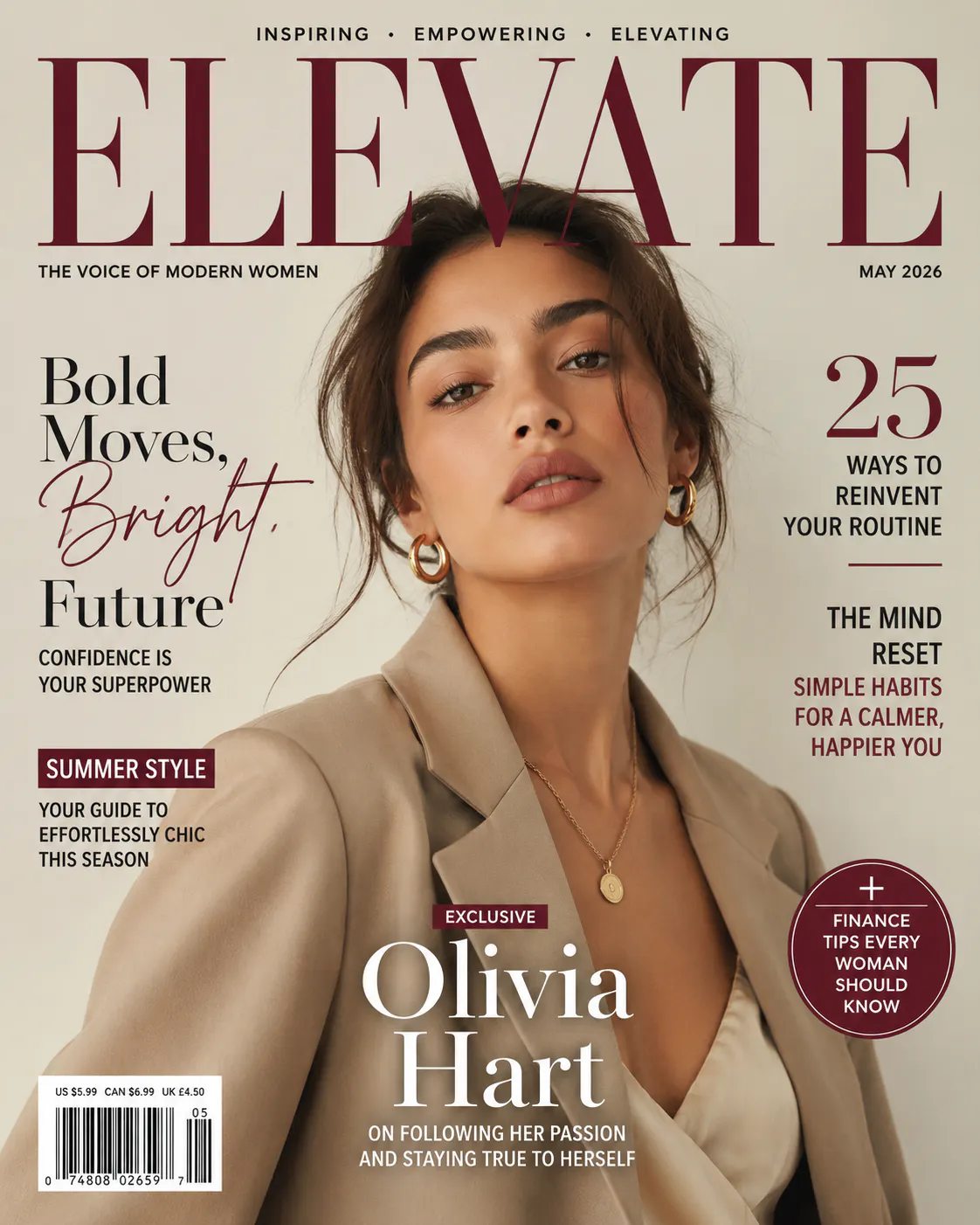
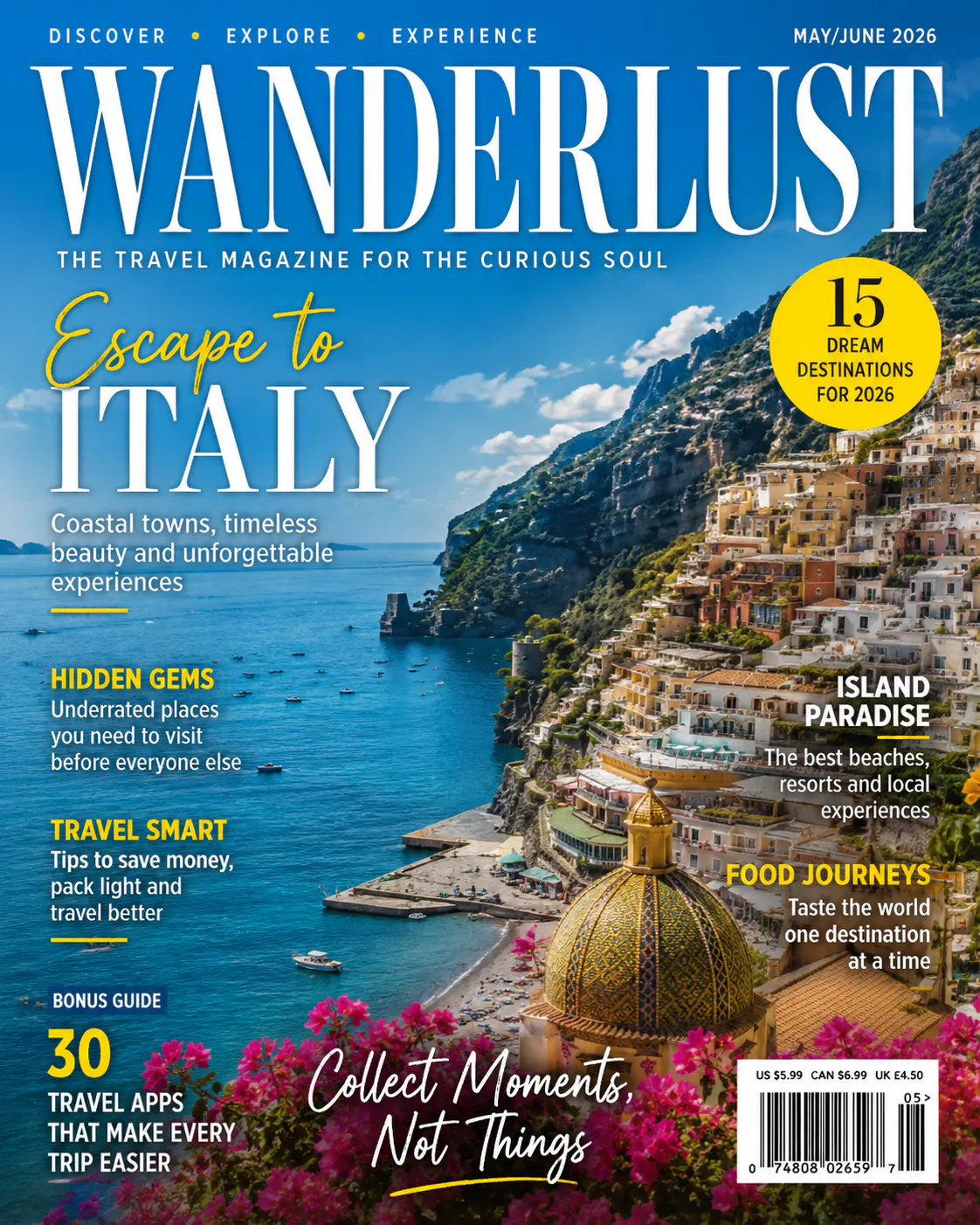

What Makes a Great Magazine Cover?
Creating a beautiful cover isn't just about using attractive colours. Every successful magazine combines several design elements that work together.
1. Start with a strong cover image
Your main image is the focal point of the entire design. Choose a high-resolution image with sharp details and good lighting. Avoid cluttered backgrounds that compete with your headlines. If your image needs editing, remove distractions before designing the cover.
This is where Blend can save you a significant amount of time. Instead of editing photos across multiple applications, you can improve your images with AI before importing them into your final design. The cleaner your image looks, the more professional your cover will appear.
2. Choose typography that is easy to read
Magazine headlines should immediately grab attention. Stick to two or three complementary fonts and make sure readers can understand every headline at a glance.
Fashion magazines often use elegant serif fonts, while technology or business magazines usually prefer clean sans-serif typography. Whatever style you choose, readability should always come first.
3. Create headlines that spark curiosity
Your headlines should tell readers why your magazine is worth reading. Instead of just writing: “Travel Destinations”, try something more engaging: “12 Hidden Beaches you will Want to Visit This Year”. Specific headlines feel more valuable because readers immediately know what they'll gain.
4. Leave enough white space
One common mistake beginners make is trying to fill every corner of the page. Professional magazine covers use empty space intentionally. White space improves readability and makes your design feel premium instead of overcrowded.
5. Keep your colours consistent
Using too many colours creates visual clutter. Choose two or three primary colours that complement your main image. A consistent colour palette makes your publication feel more polished and strengthens your brand identity over time.
RELATED READING: Wedding Invitation Card Maker Online Free: Create Stunning Wedding Invites in Minutes
Magazine Cover Ideas to Inspire Your Next Issue
Sometimes the hardest part of creating a magazine cover is deciding where to start. If you are looking for inspiration, these popular magazine styles can help spark ideas.
Fashion magazine covers
Fashion magazines focus heavily on strong photography and elegant typography. Use:
- Studio portraits
- Neutral colour palettes
- Luxury-inspired fonts
- Clean layouts
- Minimal distractions
The goal is to make the subject the centre of attention.
Travel magazine covers
Travel publications work best when they create a sense of adventure. Popular choices include beaches, mountains, historic cities, natural landscapes, and cultural landmarks. Use vibrant imagery and headlines that encourage readers to explore new destinations.
Food magazine covers
Food magazines rely on appetite appeal. Focus on:
- Close-up photography
- Natural lighting
- Rich colours
- Simple backgrounds
- Clear typography
The food itself should remain the star of the design.
Business magazine covers
Business publications often prioritise professionalism and authority. You can consider, executive portraits, city skylines, modern office environments, and clean graphic elements.
Lifestyle magazine covers
Lifestyle publications have more flexibility. They often combine:
- Portrait photography
- Home interiors
- Wellness themes
- Travel content
- Fashion elements
This category gives you the most creative freedom when designing your cover.
RELATED READING: Wattpad Cover Maker: Create Wattpad Book Covers with Blend
Conclusion
Choosing the right magazine cover maker can make the difference between a cover that gets ignored and one that immediately grabs attention. That's where Blend's magazine cover maker can help you out. Rather than relying solely on pre-made templates, it helps you create original magazine covers using AI while giving you the flexibility to edit every detail.