


Creating multiple clothing color variants used to require expensive photoshoots, complicated Photoshop editing, and endless production time. But now, with an AI clothes color changer, you can instantly recolor apparel while keeping every fabric detail realistic.
If you run a fashion ecommerce store, manage a clothing brand, sell on Shopify, or create fashion content for social media, then AI apps like Blend can make apparel recoloring faster, easier, and far more scalable. Scroll down and find out how to recolor dress and clothes color in just a few seconds.
Instead of booking a new photoshoot for every color variant your supplier offers, you can generate every colorway from a single product photo. Try Blend's Recolor tool to see how it works, with higher-volume batch use available on the PRO and MAX plans, a fraction of what a reshoot per colorway would cost in photographer fees alone.
What is an AI Clothes Color Changer?
An AI clothes color changer is a smart editing tool that automatically detects clothing inside an image and changes the apparel color while preserving:
- Fabric texture
- Wrinkles
- Shadows
- Stitching
- Highlights
- Natural folds
Unlike traditional editing software, AI understands the structure of garments. That means your recolored apparel still looks naturally photographed instead of artificially painted. You can use AI to recolor all kinds of apparel and clothing.
RELATED READING: 9 Best AI Fashion Model Tools for Clothing Brands in 2026 (Tested and Compared)
How to Change Clothes Color Online Using Blend
Changing apparel colors with AI inside Blend takes only a few clicks. You can create realistic outfit variations without complicated editing software or expensive photoshoots.
Step 1: Open Blend and Select Recolor
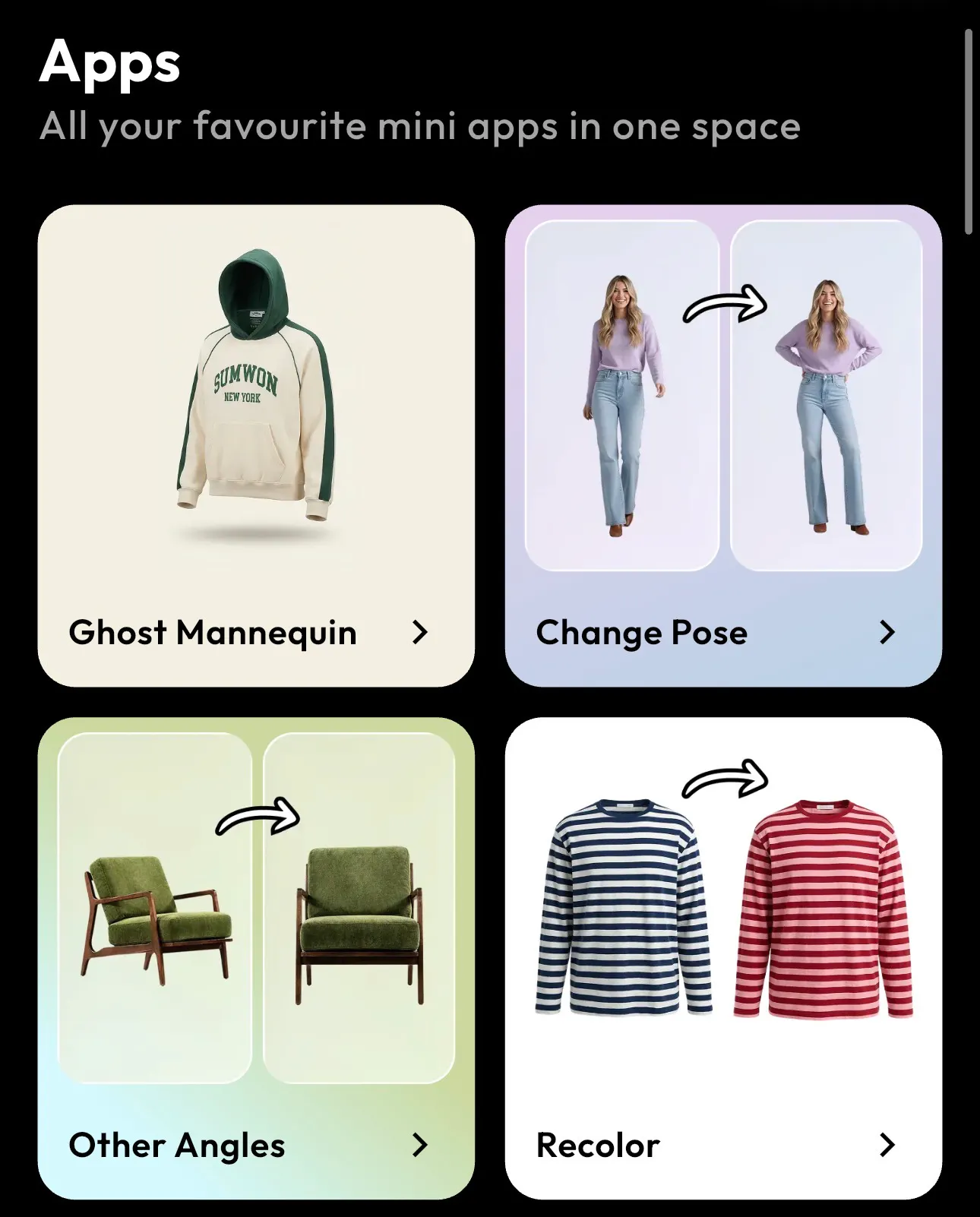
Go to the Blend app and hover over the Apps section. From there, select the Recolor tool to start editing your apparel image. Alongside Recolor, you will also see other AI tools like Ghost Mannequin, Change Pose, and Other Angles that help improve fashion product photography workflows.
Step 2: Upload Your Clothing Image
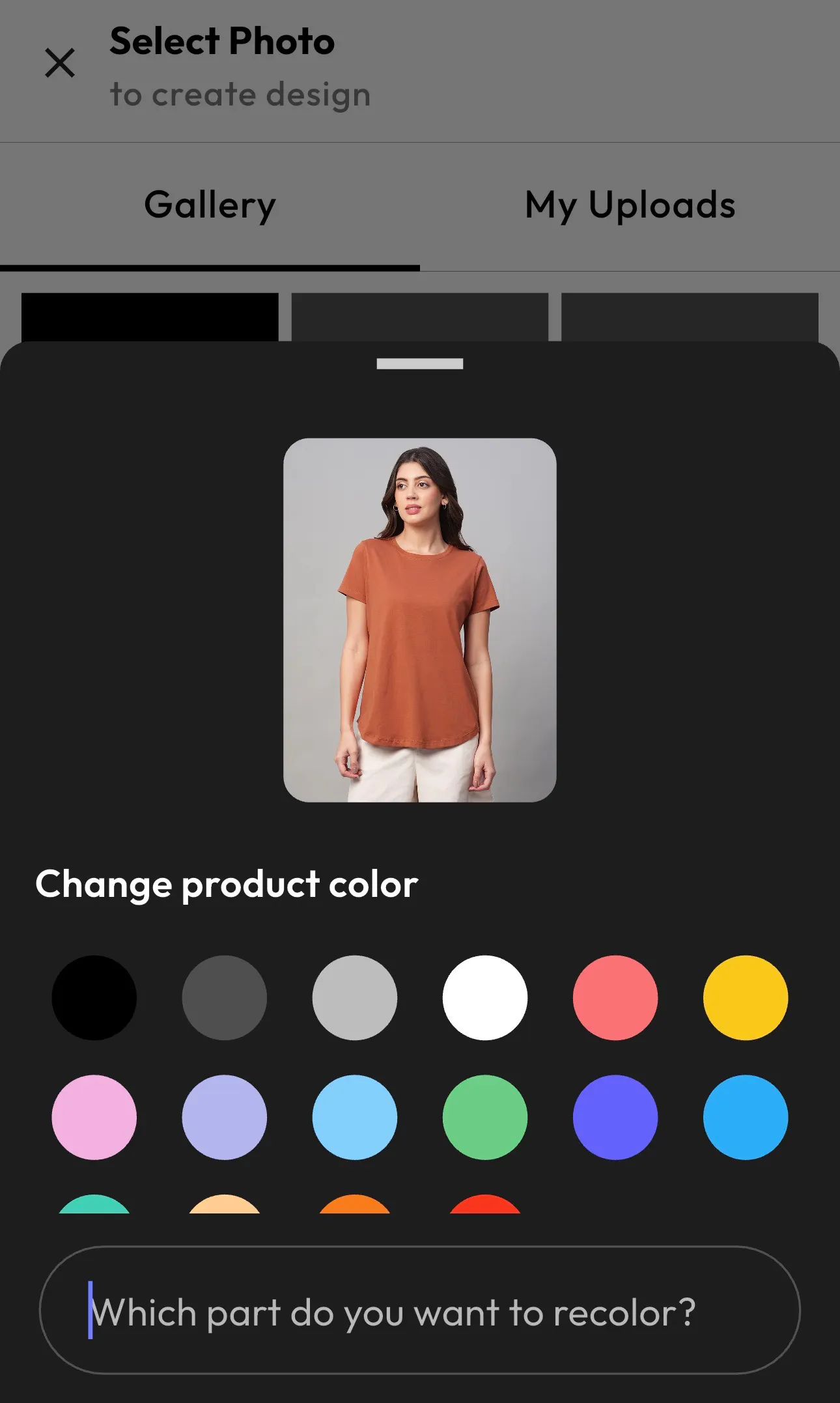
Upload your fashion image directly from your gallery or uploads section. Blend works well with ecommerce product photos, fashion model shots, clothing catalogs, and apparel mockups.
The AI automatically detects the clothing item inside the image, making the editing process incredibly fast and beginner-friendly.
Step 3: Choose the Apparel Area and Change the Color
Once your image is uploaded, select the part of the clothing you want to recolor. You can change the shade of the entire outfit or specific sections like sleeves, hoodies, or shirts.
Choose a new color from the palette and Blend instantly generates a realistic apparel variation while preserving fabric texture, lighting, shadows, and stitching details.
Step 4: Export the Final Image
After recoloring your apparel image, export it in high quality for Shopify listings, ecommerce stores, Instagram posts, Amazon product pages, or fashion catalogs. Blend helps you create marketplace-ready visuals within minutes without expensive editing software.
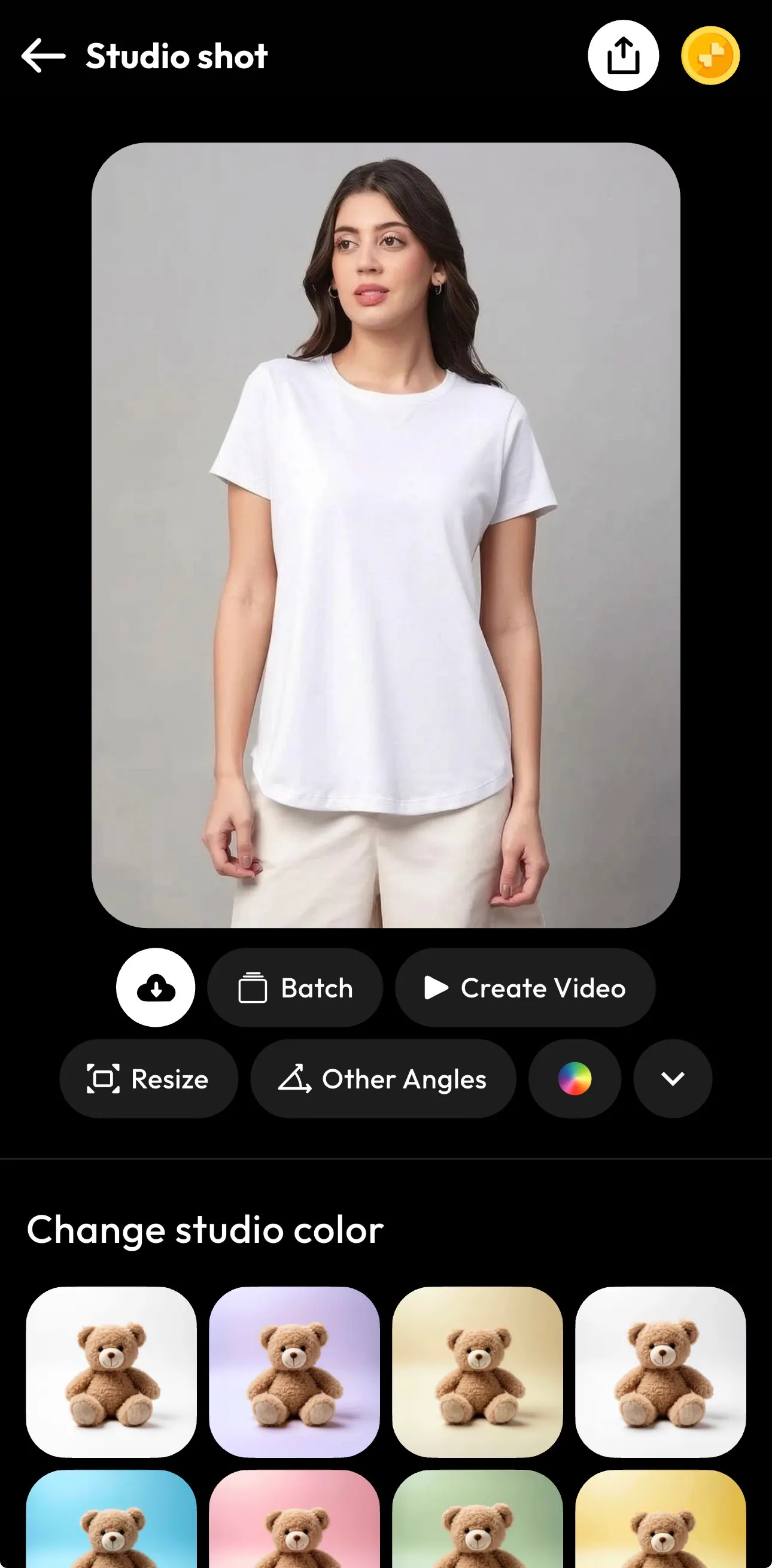
Step 5: Customize Your Final Studio Shot
Once your apparel image is ready, you can further customize the final output inside Blend. Change the studio background color, resize the image for different platforms, generate other angles, or create AI-powered fashion videos directly from the editor.
This helps you turn a simple product photo into a complete ecommerce-ready visual for Shopify stores, Instagram campaigns, Amazon listings, and fashion ads.
Turn Apparel Images Into AI Fashion Videos
After recoloring your clothing image, you can transform it into engaging video content using Blend AI Videos.
This helps you create:
- Instagram Reels
- TikTok fashion videos
- Product launch ads
- Ecommerce promotions
- Clothing showcase videos
Instead of manually animating apparel visuals, AI helps you create fashion marketing content within minutes.
Why Blend Is One of the Best AI Clothes Color Changer Tools
There are many AI apparel editing tools available today, but Blend simplifies the entire workflow for fashion creators and ecommerce brands.
1. Beginner-Friendly Editing
You do not need Photoshop or advanced design skills. The AI automatically detects garments and handles the recoloring process.
2. Realistic AI Recoloring
Blend preserves realistic apparel details like wrinkles, fabric texture, shadows, lighting, and stitching. This makes the recolored outfit look authentic and ecommerce-ready.
3. Fast Fashion Content Creation
You can create multiple clothing variants, resize visuals, generate studio shots, and build marketing videos from the same dashboard.
4. Perfect for Ecommerce Brands
Blend helps streamline fashion product photography workflows for Shopify stores, Etsy sellers, Amazon brands, fashion startups, and apparel manufacturers.
AI Clothes Color Changer vs Photoshop
Many brands are replacing traditional editing workflows with AI because it is significantly faster.
Feature | AI Clothes Color Changer | Photoshop |
Editing Speed | Instant | Manual |
Skill Required | Beginner-friendly | Advanced |
Batch Variants | Easy | Time-consuming |
Apparel Detection | Automatic | Manual masking |
Ecommerce Workflow | Optimized | Complex |
Scalability | High | Limited |
AI dramatically reduces production time for fashion ecommerce visuals.
FAQs
Is changing clothes color with AI free?
You can try Blend's Recolor tool to see how it works; higher-volume use is available on Blend's PRO and MAX plans.
Will recoloring an outfit with AI damage fabric texture or shadows?
No. Blend's AI detects the garment's structure and preserves fabric texture, wrinkles, shadows, and stitching while only changing the color. The result looks like a different-colored garment was photographed, not a flat color overlay.
Can I recolor just part of an outfit, like sleeves or a collar, instead of the whole garment?
Yes. After uploading your image, you can select a specific section of the clothing and recolor just that area while leaving the rest of the garment untouched.
What file formats can I export after recoloring?
Export your recolored image in high resolution, ready for Shopify listings, Amazon product pages, Instagram posts, or fashion catalogs.
How much does it cost to generate different color variants of a product photo?
A single product photo inside Blend can produce every colorway you need. Pricing scales across the free, PRO, and MAX tiers based on volume, replacing what would otherwise be a per-variant reshoot cost.
Can I batch-recolor multiple products at once?
Yes. Upload several product images and run color changes across them in one session, which is especially useful for sellers listing 50+ SKUs with multiple colorways each.
Conclusion
An AI clothes color changer helps you create realistic apparel color variations without expensive photoshoots or manual editing. Use Blend and recolor outfits, generate professional product images, create fashion-ready content, and even turn apparel visuals into engaging AI-powered videos.
Ready to upgrade your product visuals? Studio shots, AI model shots, lifestyle scenes, & product videos — all without a shoot.
Start creating for free