


Getting customers to your website is only half the battle. It doesn’t matter if they discover your products through Google, social media, paid ads, or email campaigns, every visitor eventually lands on one place that determines whether they will buy. That’s your product detail page design.
A product detail page (PDP) is where curiosity turns into confidence. It's where shoppers decide if your product looks trustworthy, whether it meets their needs and if your brand deserves their money. Even a small improvement to your PDP can increase conversions, reduce returns and improve customer satisfaction.
According to Baymard Institute, many online stores still fail to provide enough product information or imagery, making it difficult for shoppers to make informed decisions. When customers can't find the answers they're looking for, they simply leave.
Nowadays, creating a high-converting ecommerce product detail page design doesn't require a complete website redesign. If you’re wondering how, then ready along and learn the essential elements of the best product detail page design, discover proven UX and SEO best practices, and find practical ways to create product pages that both customers and search engines love.
What is a Product Detail Page?
A product detail page (PDP) is a dedicated webpage that showcases a single product and provides everything a customer needs to make a purchase decision.
Unlike category pages, which help shoppers browse multiple products, a PDP focuses entirely on one item. It combines product images, descriptions, pricing, specifications, customer reviews and purchase options into one cohesive experience.
A strong product details page design should answer the most common customer questions before they're even asked.
For example:
- What does the product look like?
- What problem does it solve?
- How big is it?
- What materials is it made from?
- What do other customers think?
- How quickly can it be delivered?
- Can it be returned if it doesn't meet expectations?
The easier it is for customers to find these answers, the more confident they'll feel about completing their purchase.
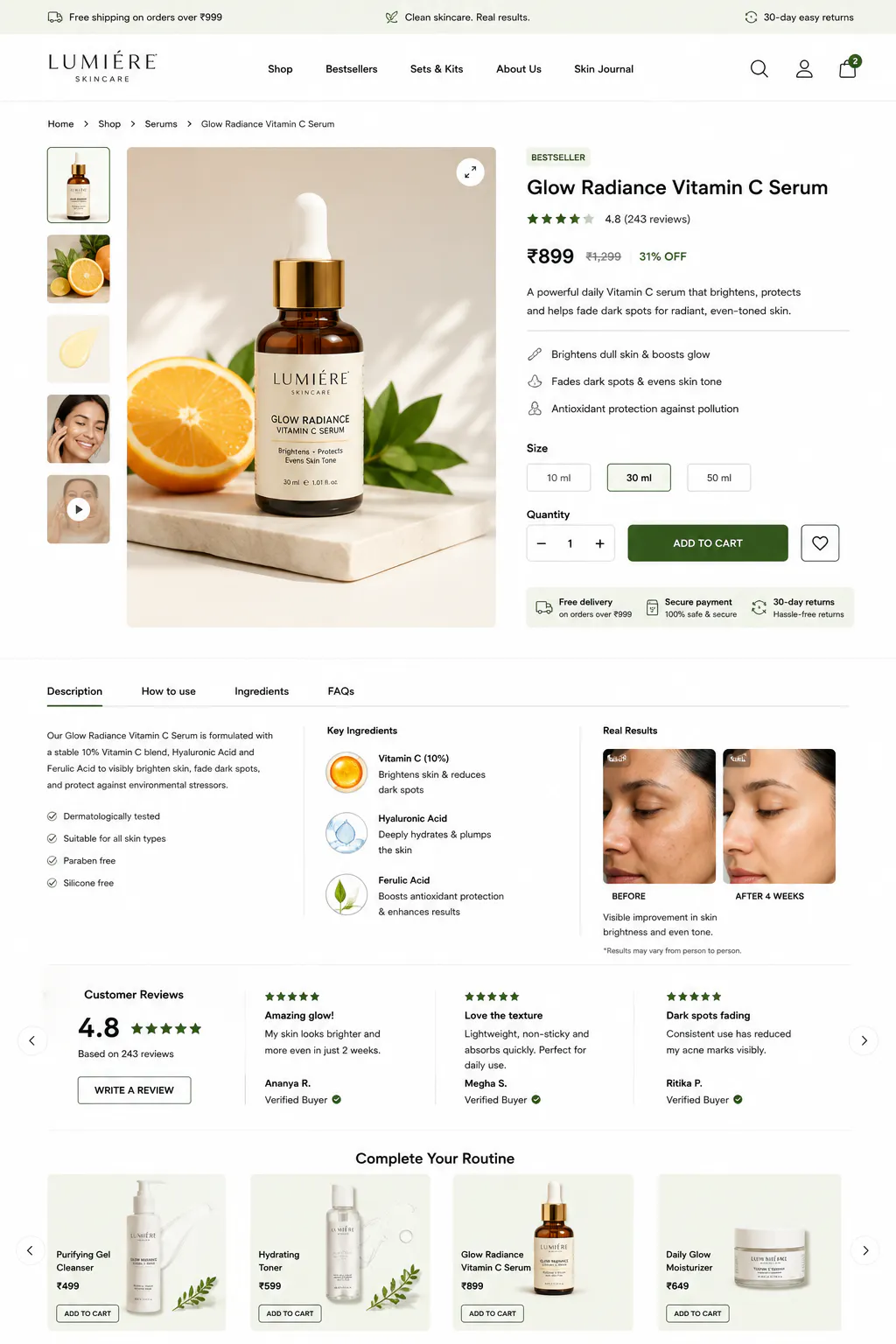
9 Essential Elements of a High-Converting Product Detail Page
Every successful product detail page design shares a few common characteristics. Instead of overwhelming shoppers with information, it guides them through a logical buying journey. Let's look at the elements that matter most.
1. Write a descriptive product title
Your product title should immediately tell shoppers what they're looking at. Instead of using generic names like Classic Backpack or Premium Bottle, include information that helps customers identify the product quickly.
A strong title should clearly describe the product and include important attributes such as material, size or capacity. You should also naturally incorporate relevant search keywords.
For example: 35L Waterproof Hiking Backpack with Laptop Compartment. This title is descriptive, keyword-rich and informative without sounding unnatural..
2. Invest in professional product photography
Your product images are often the first thing shoppers notice. If they look blurry, inconsistent or poorly lit, customers may question the quality of the product itself. In fact, Baymard Institute identifies insufficient product imagery as one of the most common usability issues on ecommerce websites.
Your hero image should:
- Clearly showcase the product in multiple angles. You can use Blend’s “Other Angles” feature to include different perspectives.
- Use consistent lighting and accurate colours.
- Highlight important details like stitching and craftsmanship
- Load quickly without compromising quality.
You can also upload some lifestyle images using Blend’s Lifestyle Shot to help shoppers imagine your product in everyday use.
3. Use product videos to remove uncertainty
Some products simply need movement to be understood. Videos demonstrate functionality far better than static images.
They're especially useful for products that:
- Fold or expand.
- Require assembly.
- Include moving parts.
- Have interactive features.
- Need demonstrations before purchase.
According to Wyzowl's State of Video Marketing report, nearly 89% of consumers say watching a product video has convinced them to buy.
Your video doesn't need cinematic production quality. Go to blendnow.com and use their AI Video feature to turn a product photo into a video. It will create a short video of your product.
4. Write descriptions that focus on benefits
Many ecommerce businesses write descriptions that sound like technical manuals. Customers don't buy features. They buy outcomes.
Instead of saying: "Made from stainless steel." Explain why that matters. Try writing something like this: "The stainless steel construction resists rust, stays looking new for longer and handles everyday use without losing its finish."
Your product description should answer questions naturally while helping customers understand how the product improves their lives.
A strong description should:
- Explain who the product is for.
- Highlight the biggest benefits before technical features.
- Address common customer concerns.
- Include relevant keywords naturally.
- Use simple, conversational language.
Avoid stuffing keywords like product detail page design into every paragraph. Instead, write naturally and focus on being genuinely helpful.
5. Present pricing clearly
Pricing is more than just displaying a number. The way you present pricing influences how customers perceive value. Avoid hiding delivery charges until checkout.
Unexpected costs remain one of the biggest reasons shoppers abandon their carts. Transparent pricing helps build trust long before customers reach the payment page.
6. Build trust with customer reviews
Before buying online, most people want reassurance from someone who's already purchased the product. That's why reviews remain one of the strongest trust signals in product details page design.
According to research from the Spiegel Research Center, displaying customer reviews can increase conversion rates by as much as 270%, particularly for products that require greater consideration before purchase.
7. Make shipping and returns easy to understand
Customers shouldn't have to search your FAQ page to find delivery information. Display shipping details close to the purchase button so shoppers know exactly what to expect.
Include information such as:
- Estimated delivery dates.
- Shipping costs.
- Free shipping thresholds.
- Return period.
- Exchange policy.
- Warranty details.
A transparent return policy reduces purchase anxiety because customers know they have options if something isn't quite right.
8. Optimize your product detail page for mobile users
Your customers aren't just shopping from their laptops anymore. They browse products while commuting, watching TV or waiting in a queue. If your product details page UI design doesn't work well on a smartphone, you're likely losing potential sales before shoppers even reach checkout.
A mobile-friendly PDP isn't simply a smaller version of your desktop page. It should be designed specifically for smaller screens, where every pixel matters.
Focus on making the experience effortless by ensuring that your page:
- Loads quickly, even on slower mobile networks.
- Displays large, swipeable product images.
- Keeps the Add to Cart button easy to find.
- Uses readable font sizes without requiring users to zoom in.
- Provides enough spacing between buttons to prevent accidental taps.
- Prioritises essential information above the fold.
Google has consistently highlighted the importance of mobile usability as both a ranking factor and a user experience signal. If your page feels slow or difficult to navigate, shoppers won't wait—they'll move on to another retailer.
9. Improve your product page SEO
Even the best product detail page design won't generate sales if customers can't find it. That's why SEO should be an essential part of every product page. Instead of forcing keywords into your content, focus on making your page clear, informative and easy for search engines to understand.
- Optimize your product title
Use a descriptive title that tells both shoppers and search engines exactly what you're selling. Rather than using a generic name like Classic Running Shoes, choose something more specific, such as Men's Lightweight Running Shoes with Cushioned Sole. This improves search visibility while helping customers find the right product.
- Write unique product descriptions
Avoid copying manufacturer descriptions, as duplicate content can affect your search rankings. Instead, write original copy that explains what the product does, who it's for and why it's worth buying. A unique description also gives your brand a distinct voice.
- Optimize your product images
Product images can support your SEO as well as your user experience. Compress images to improve loading speed, use descriptive file names instead of generic ones, and add meaningful alt text that accurately describes the product.
- Add Product Schema
Implementing Product Schema helps search engines understand important information such as your product name, price, availability, reviews and brand. It also increases the likelihood of earning rich snippets in search results, making your product listings more noticeable and improving click-through rates.
Product Detail Page Design Inspiration From Leading Brands
If you're looking for product detail page design inspiration, study successful ecommerce brands to understand what makes their product pages effective rather than simply copying their layouts.
Apple
Apple uses a clean, minimal layout with large product images and concise, benefit-focused copy. Information is revealed gradually, keeping the page easy to navigate and focused on the product.
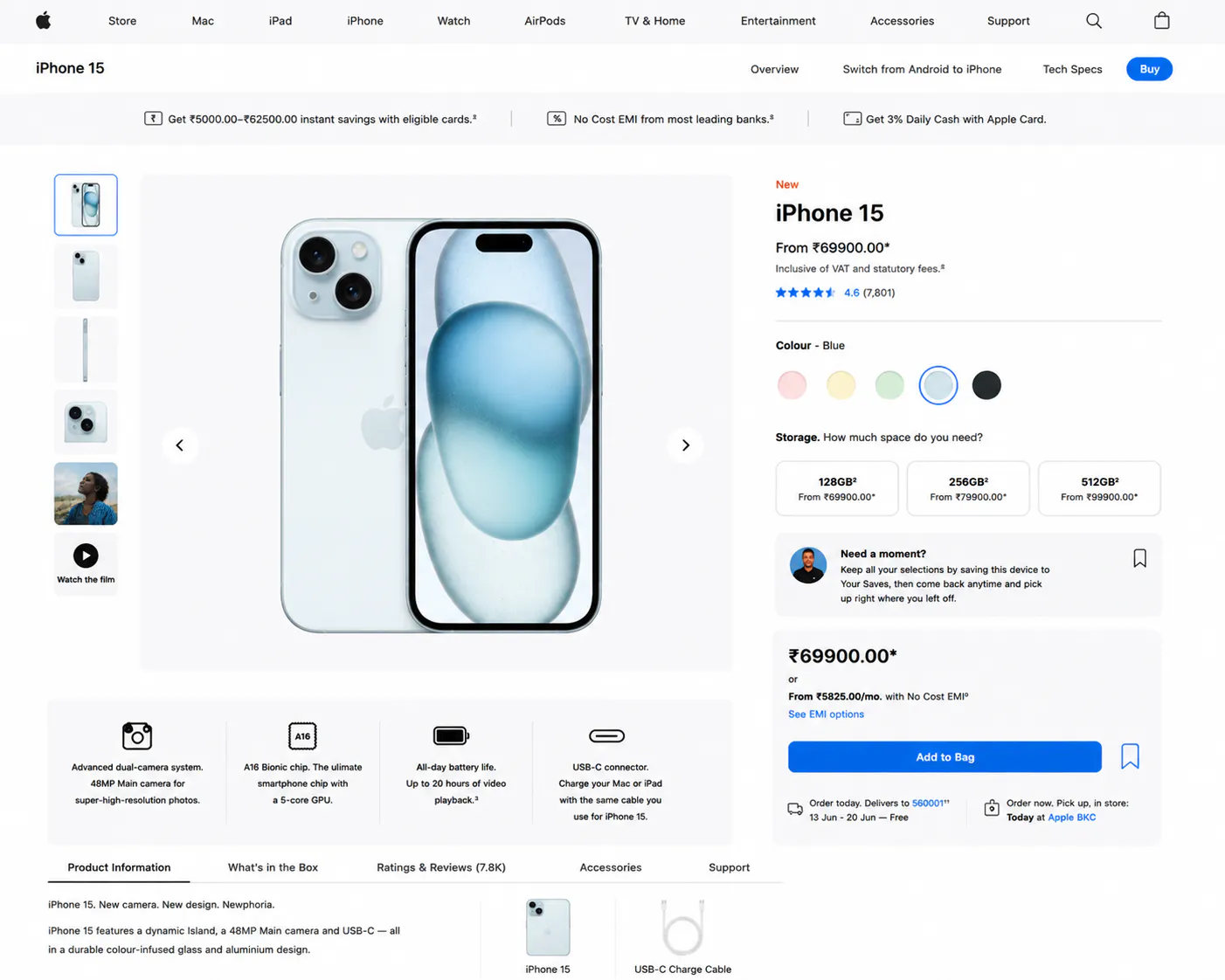
Key takeaway: Keep your design simple and distraction-free.
Nike
Nike combines high-quality studio photography with lifestyle images, making products both aspirational and informative. Customers can easily explore colour options, reviews and delivery details without leaving the page.
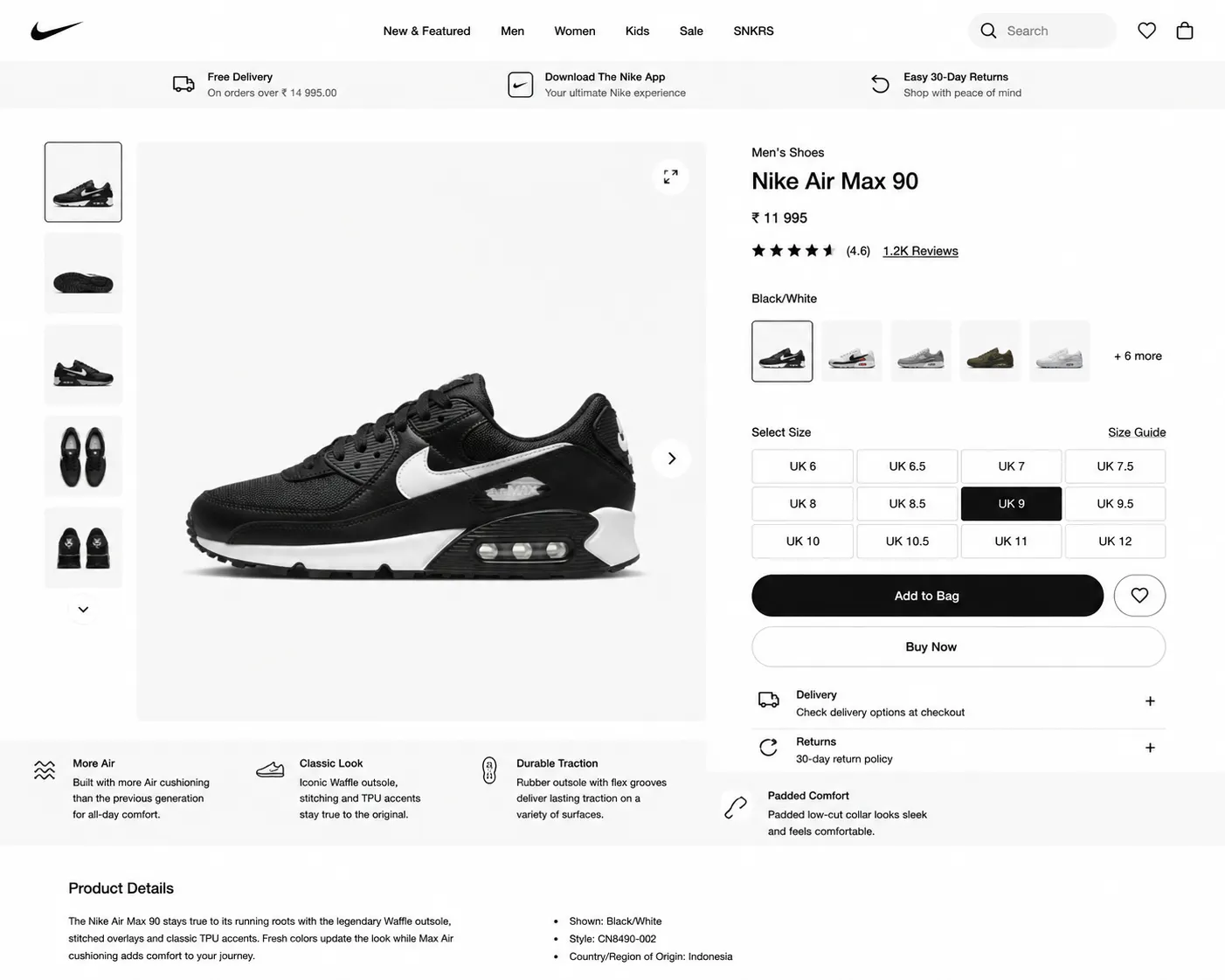
Key takeaway: Balance visual storytelling with essential product information.
IKEA
IKEA places products in realistic home settings to help customers visualise them in everyday life. Clear dimensions, assembly details and related products further reduce purchase uncertainty.
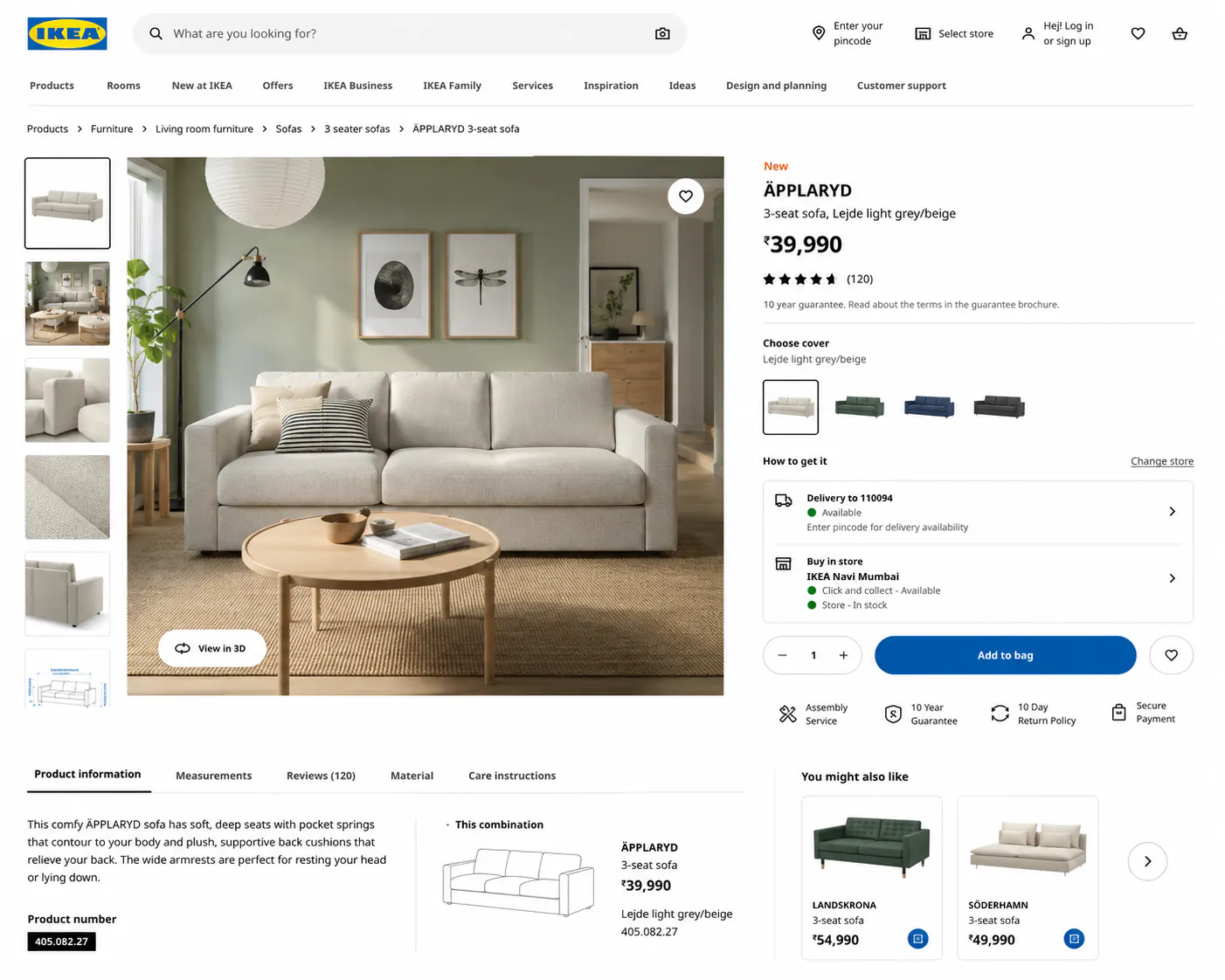
Key takeaway: Show your product in context to help customers imagine owning it.
Conclusion
Your product detail page design is where every marketing effort comes together. It's the page that transforms curiosity into confidence and browsers into buyers. The highest-converting product pages aren't necessarily the most complicated. They're the ones that answer customer questions quickly, showcase products beautifully and remove every possible source of doubt.
If you are redesigning your product detail pages, don't overlook your visuals. Blend helps you create professional ecommerce images quickly, so you can focus on improving the overall shopping experience.