


Every brand owner works really hard to get their Amazon or Shopify listings right. They source products, manage pricing, work on the keywords, and handle logistics. Despite all these efforts, returns keep coming in. We get it. It can be really frustrating because returns eat into your margins and can affect your income.
Honestly, the problem often is not your product. It is how you present it. That’s why you need to crack the code on how to reduce returns on eCommerce. We have all the answers you need to improve your return rates. Scroll down and find out how to reduce returns on Amazon.
Why Customers Return Products Online
When a customer shops in a physical store, they can touch, inspect, and understand a product before buying it. Online, they cannot. They depend entirely on your product images to make a decision.
Most returns happen because:
- The product looks different from the images
- The size or scale is unclear
- The material or quality is misunderstood
- Important details were not visible
In other words, customers are not returning your product. They are returning the version of the product they imagined which your product didn’t deliver. To reduce returns on eCommerce, your job is to eliminate that imagination gap.
5 Tips on How to Reduce Returns in ECommerce with Blend
If your image fails to match the product the customers receive, then your returns will be high. With the help of AI-powered apps like Blend, you can finally learn how to reduce returns on Shopify and Amazon. Here’s what you need to do:
1. Show Multiple Angles Using Studio Shot
One of the simplest ways to reduce returns is to stop relying on a single image. Customers need to see your product from every relevant angle to feel confident about their purchase.
You should include:
- Front, back, and side views
- Close-ups of key features
- Packaging and included items
The more complete your visual presentation, the less guesswork your customer has to do. With Blend’s Studio Shot feature, you can create multiple variations of your product images without organizing complex photoshoots. This is a great feature that you can use to give your products a white background.
Moreover, you can use the “other angles” panel and show your product from different angles.
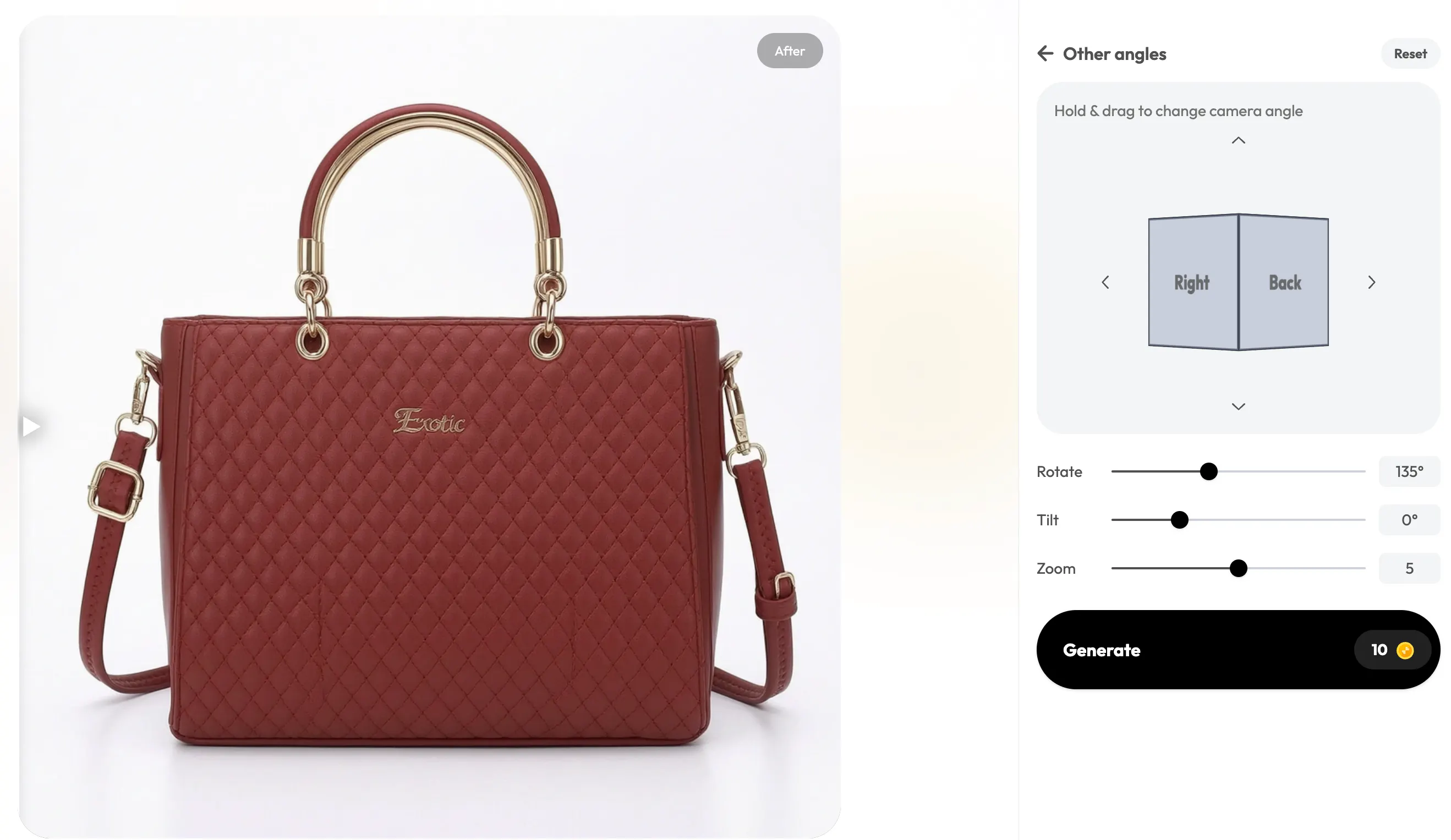
Start from a single image and then generate multiple images with different perspectives. You can rotate, tilt, and zoom to fully showcase your product.
2. Use Lifestyle Images to Set the Right Expectations
A product shown on a plain background is informative, but it is not always enough. If you list on eBay, then you need something more than a plain background. Your customers want to understand how your product fits into real life.
Blend’s Lifestyle Shot feature helps you:
- Show the product in use
- Provide a sense of scale
- Create emotional connection
For example, clothing looks different on a model than on a hanger. Furniture feels more realistic when placed in a room.
When you use the Blend app or website, you can generate lifestyle backgrounds and place your product into realistic environments without organizing expensive shoots.

(Image created using Blend's Lifestyle Shot)
3. Stay Honest and Avoid Over-Editing
It can be tempting to make your product look perfect. But over-editing often leads to disappointment. If the color looks different in real life or the texture appears unrealistic, customers will feel misled and betrayed. This is one among the best ways to boost sales online.
4, Clearly Communicate Size and Scale
One of the most common reasons for ecommerce returns is incorrect size expectations. Numbers alone are not enough. Customers struggle to visualize dimensions without context. You need to visually demonstrate the size of your product.
Thoroughly understand the Amazon listing size guide and Shopify image size guide to reduce returns. Here’s what you should do to clearly mention sizes of your products:
- Include reference objects (such as hands or everyday items)
- Show the product in use
- Add visual indicators for size
When customers know exactly what size to expect, they are less likely to be disappointed.
5. Maintain Consistency Across Your Store
If you sell on Poshmark or other eCommerce platforms, then consistency plays a key role in building trust. If your product images vary in lighting, background, or style, your store can feel unprofessional. This inconsistency can create doubt and increase the likelihood of returns.
Use Blend’s batch photo editor and make sure that your visuals follow a consistent structure. They should have the same background style and the lighting should be uniform.
Scale High-Quality Product Images Without Increasing Costs Using Blend
Creating professional product images traditionally requires time, money, and coordination. For growing ecommerce businesses, this approach is difficult to scale.
Blend, one of the best Canva alternatives, simplifies the entire process by offering:
- Instant background removal
- AI-generated backgrounds and scenes
- AI videos
- Magic eraser to clear up distractions from the image
Instead of organizing repeated photoshoots, you can create high-quality visuals in minutes.
Conclusion
If you want to reduce returns in ecommerce, you need to look beyond your product and focus on how it is presented. Your product images set expectations. When those expectations are clear and accurate, customers are more satisfied with what they receive.
Start by making your images clearer, complete, and more realistic. With tools like Blend, you can do this efficiently and at scale without having to rely on expensive resources. Go ahead. Let your images do all the communication and your eCommerce returns will naturally decrease.
FAQs
How can I reduce returns in ecommerce?
Improve product images, provide accurate descriptions, show multiple angles, include size references, and set clear expectations to reduce customer confusion and returns.
Why do customers return products online?
Customers return products when items look different from images, sizing is unclear, or expectations are not met due to poor product presentation.
Do product images affect return rates?
Yes. Clear, high-quality product images reduce misunderstandings, helping customers know exactly what to expect and lowering return rates.