



Creating visual content for ecommerce used to mean hiring photographers, designers, and video editors. In 2026, AI tools handle most of that pipeline. You can generate product photos, lifestyle scenes, on-model shots, social graphics, and video from a text prompt or a single product image.
The problem is not a lack of options. There are dozens of AI visual tools available, and most of them overlap in confusing ways. Some are built for ecommerce product photography. Others are general-purpose design platforms. A few specialize in video, illustration, or social media graphics. Picking the wrong tool means paying for capabilities you do not need while missing the ones you do. Here are 11 tools that cover the full spectrum of AI visual content creation, what each one does best, what it costs, and how it compares to the others.
How to Choose the Right AI Visual Content Tool
Not every tool fits every use case. Before comparing individual platforms, narrow down what you actually need.
Match the Tool to Your Primary Content Type
An ecommerce seller who needs product listing images has fundamentally different needs than a marketing team creating social media graphics or a content creator producing video. Product photography tools, general design platforms, and video generators are three distinct categories. Choosing a tool built for your primary content type saves time and produces better results than forcing a general-purpose platform to do a specialized job.
Weigh Output Quality Against Speed and Cost
Some tools prioritize photorealistic quality at the expense of speed and simplicity. Others trade some visual polish for faster output and lower pricing. For most ecommerce sellers and small brands, the sweet spot is a tool that produces listing-ready visuals quickly, without requiring design skills or expensive subscriptions.
11 AI Visual Content Creation Tools Worth Using in 2026
Here is a list of 11 visual content creation tools worth using in 2026.
1. Blend
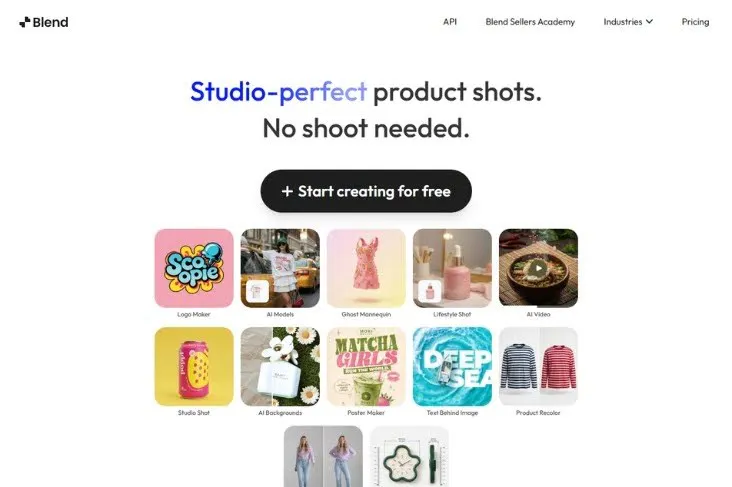
Best for: Ecommerce product photography, lifestyle visuals, on-model shots, and product video
Blend is a complete AI visual content creation platform built for online sellers. Upload a product photo and generate studio-quality product photography, lifestyle scenes, on-model shots, and short-form product videos from a single image. The platform also includes background removal, a magic eraser for cleanup, and logo creation, so everything a seller needs lives in one dashboard.
- Photo-to-lifestyle, photo-to-model, and photo-to-video workflows
- Built specifically for ecommerce product content
- No design skills, scripting, or video editing needed
- Free tier available
2. Canva
Best for: Social media graphics, presentations, and marketing templates
Canva is the most widely used design platform for non-designers. Magic Design generates complete graphics from a text prompt, and the template library covers social posts, ads, presentations, email headers, and print materials. Strong for teams that need branded visual assets quickly across multiple marketing channels.
Pricing: Free plan available. Pro plan at $12.99/month.
Where it falls short vs. Blend: Canva is a general design tool, not a product photography platform. You cannot upload a product photo and generate realistic lifestyle scenes, on-model shots, or product videos. Ecommerce sellers who need listing-ready product imagery will find Canva useful for social graphics but insufficient for the core product visuals that drive conversions.
3. Adobe Firefly
Best for: Generative AI integrated into professional Creative Cloud workflows
Adobe Firefly brings text-to-image generation, generative fill, and style transfer directly into Photoshop, Illustrator, and Express. For designers already working in the Adobe ecosystem, Firefly adds AI generation without switching platforms. Commercially safe training data means outputs are cleared for business use.
Pricing: Included with Creative Cloud plans ($22.99/month for Photoshop). Standalone Firefly access from $9.99/month.
Where it falls short vs. Blend: Firefly requires design expertise and Adobe software proficiency. A seller who wants to upload a product photo and get back a styled lifestyle image in two clicks will find Firefly's workflow complex by comparison. Blend is built for that exact use case: no layers, no masking, no design background needed.
4. Midjourney
Best for: High-quality AI image generation from text prompts
Midjourney produces some of the most visually striking AI-generated images available. Strong for concept art, brand visuals, editorial imagery, and creative exploration. The community and prompt-sharing ecosystem make it easy to learn and iterate.
Pricing: Basic plan at $10/month. Standard at $30/month. Pro at $60/month.
Where it falls short vs. Blend: Midjourney generates images from text prompts, not from your actual product photos. The output is original AI art, not a photograph of your real product. For ecommerce sellers who need visuals that accurately represent a specific SKU, Midjourney cannot guarantee product fidelity the way Blend does by starting from the real product image.
RELATED READING: Blend vs Midjourney: Which AI Tool Is Better for Product Photography in 2026?
5. Photoroom
Best for: Fast product photo editing, background removal, and instant backgrounds
Photoroom is a mobile-first product photo editor used by millions of marketplace sellers. One-tap background removal, AI shadows, and instant background templates make it fast and accessible. Strong for sellers who need clean product shots quickly, especially on mobile.
Pricing: Free plan available. Pro plan at $12.99/month.
Where it falls short vs. Blend: Photoroom handles product photo editing well but does not generate on-model imagery, virtual try-on for apparel, or product videos. Blend covers the full visual pipeline from photo cleanup to lifestyle scenes to model shots to video, which Photoroom requires multiple separate tools to replicate.
RELATED READING: Blend vs Photoroom: A Complete Comparison
6. Runway
Best for: Creative AI video generation and visual effects
Runway Gen-4 is the filmmaker's choice for AI video, with advanced camera controls, motion brushes, and custom model training. Output quality is among the highest available for cinematic and creative video content.
Pricing: Free tier available. Pro at $15/month. Unlimited at $95/month.
Where it falls short vs. Blend: Runway is built for creative professionals, not ecommerce sellers. There is no product photography workflow, no listing integration, and the learning curve is steep. Blend generates marketplace-ready product videos from a single photo upload with no video editing knowledge required.
7. DALL-E (via ChatGPT)
Best for: Quick text-to-image generation for brainstorming and concept visuals
DALL-E, accessible through ChatGPT, generates images from natural language descriptions. Useful for brainstorming product concepts, creating marketing mockups, and generating social media visuals quickly. The conversational interface makes it approachable for non-technical users.
Pricing: Included with ChatGPT Plus at $20/month.
Where it falls short vs. Blend: DALL-E generates images from scratch, not from your real product photos. The output cannot accurately represent a specific product's color, shape, label, or material. Blend starts from the actual product image, which preserves every detail of the real item in the generated visual.
8. Flair.ai
Best for: AI product photography with scene generation
Flair.ai creates studio-quality product photography and lifestyle scenes from basic product inputs. Drag-and-drop scene building lets you place products into styled environments with AI-generated lighting and props.
Pricing: Free tier available. Pro plan from $10/month.
Where it falls short vs. Blend: Flair.ai handles product scene generation but does not offer on-model photography, virtual try-on for apparel, or product video creation. For fashion and accessory brands that need garments shown on diverse AI models, Blend fills a gap that Flair.ai does not address.
RELATED READING: Blend vs Claid: A Complete Comparison
9. Picsart
Best for: Photo editing, AI effects, and social media content creation
Picsart combines traditional photo editing with AI-powered features like background removal, AI enhance, and style transfer. Strong for creators and social media managers who need quick edits and creative effects across a high volume of images.
Pricing: Free plan available. Gold plan at $13/month.
Where it falls short vs. Blend: Picsart is a general photo editor with AI features bolted on, not a product photography platform. You cannot generate realistic lifestyle scenes from a product cutout or create on-model apparel shots. Blend is purpose-built for ecommerce visual production, which Picsart's general editing tools do not cover.
10. Figma
Best for: UI/UX design, prototyping, and collaborative design workflows
Figma's AI features (including Figma AI and third-party plugins) speed up interface design, layout generation, and component creation. Strong for product and design teams building websites, apps, and digital experiences. Not typically used for product photography or marketing visuals.
Pricing: Free for individuals. Professional plan at $15/user/month.
Where it falls short vs. Blend: Figma is a design and prototyping tool, not a visual content creation platform for ecommerce. There is no product photography, lifestyle generation, or video creation workflow. Blend and Figma serve entirely different use cases, with Blend focused on sellable product content and Figma on interface design.
11. Creatify
Best for: Ecommerce URL-to-video ad creation with AI avatars
Creatify turns product page URLs into complete video ads with scripts, voiceovers, and AI presenters. Paste a link and the platform generates a ready-to-run paid social ad. Strong for D2C brands running performance marketing campaigns on Meta and TikTok.
Pricing: Free trial available. Starter at $39/month. Growth at $99/month.
Where it falls short vs. Blend: Creatify focuses exclusively on paid ad video, not organic product content or still imagery. Pricing starts higher than Blend at $39/month. Blend covers the full visual spectrum: stills, lifestyle, on-model, and video for both organic and paid use, at a lower entry point.
RELATED READING: Blend vs Canva: A Complete Comparison
Pick the Tool That Matches How You Sell
General design tools like Canva and Picsart cover social media and marketing graphics. Professional creative tools like Midjourney, Adobe Firefly, and Runway serve designers and filmmakers. For ecommerce sellers who need product photography, lifestyle scenes, model shots, and video from a single product image, Blend is the most complete option in one platform.
Ready to create every visual your store needs? Start creating for free with Blend and generate listing-ready content from a single product photo.
Frequently Asked Questions
What is an AI visual content creation tool?
An AI visual content creation tool uses artificial intelligence to generate, edit, or enhance images, graphics, or video. For ecommerce, these tools produce product photos, lifestyle scenes, on-model imagery, and video from product inputs or text prompts.
Which AI tool is best for ecommerce product photography?
Blend is the most complete option for ecommerce sellers because it combines product photography, lifestyle scenes, on-model shots, background removal, and video generation in a single platform. Photoroom and Flair.ai are strong alternatives for specific parts of the workflow.
Can AI visual tools replace a professional photographer?
For product listings, social media, and ad creatives, yes. AI tools produce visuals that match studio quality at a fraction of the cost and turnaround time. Flagship brand campaigns and high-end editorial work may still benefit from professional photography.
How much do AI visual content tools cost?
Most tools offer free tiers with limited features. Paid plans typically range from $10 to $30/month for standard access, with professional and enterprise tiers running higher. The right investment depends on your output volume and the content types you need.
Do I need design skills to use AI visual content tools?
Not for most ecommerce-focused tools like Blend and Photoroom, which are built for non-designers. Professional tools like Adobe Firefly, Figma, and Runway require design or video editing experience to use effectively.
Can one tool handle all my visual content needs?
Blend comes closest for ecommerce sellers by covering product photos, lifestyle imagery, on-model shots, and video from one dashboard. For social media graphics and marketing templates, you may still want a design tool like Canva alongside your product photography platform.