


Social media is a game changer for brands that are trying to drive traffic and sales to their website. And let’s be honest. That’s where your brand’s first impressions are being made. With endless scrolling on platforms like Instagram, Facebook, and TikTok, users decide almost instantly whether a post deserves attention or a quick swipe past. In that split second, visuals do all the talking.
That split second is all that matters if you want your product photos to do all the talking. Look at these pictures as your digital salespeople that will nudge scrollers to click the “Shop Now” button. If you want to produce eye-catching content for your products, smart editing is the right way to go about it.
Why Social Media Is Important for Advertising Product Photos
Product photos do the heavy lifting when it comes to advertisement even before reviews and prices. On social media, a product image isn’t just a visual asset. It’s a decision trigger. Should I click it or not? That’s why it’s essential that your pictures tell users what the product is, who it’s for, and whether it’s worth a second of their attention.
Product photos on social media help you:
- Capture attention in crowded feeds
- Show product quality and details clearly
- Build trust through consistent visuals
- Encourage clicks, saves, and shares
With a great AI app, one well-edited image can reach different audiences, drive engagement, and generate traffic without making it look like it is overly promotional.
5 Ways to Turn Product Photos into High-Performing Social Media Content
Instead of constantly chasing venues for your photoshoots, check out Blend’s features that can instantly transform your product photo into multiple high-performing social media assets. Less effort, better visuals, and content that actually converts into clicks and sales. Read along and find out how you can make users stop, stare, and click.
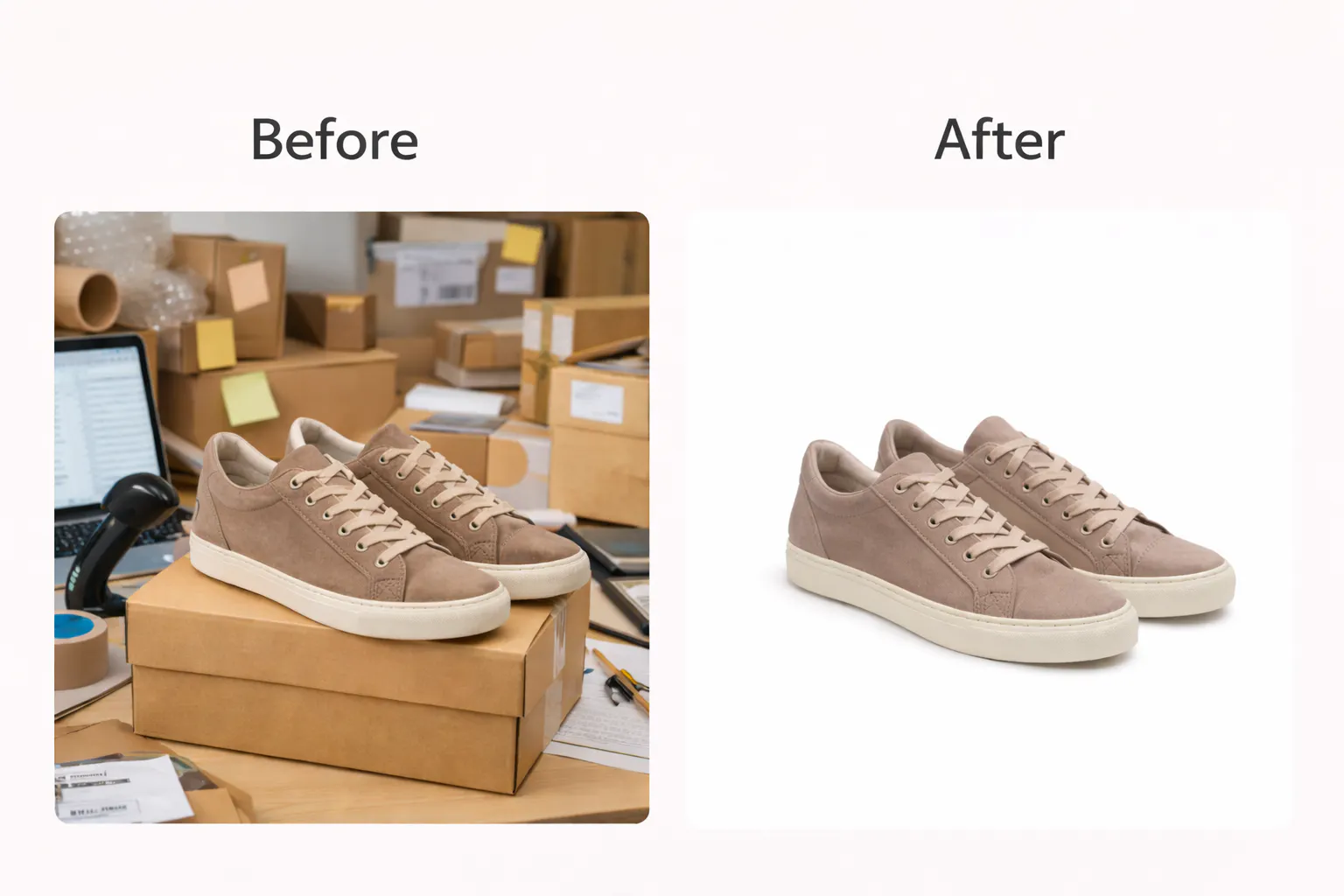
1. Remove Distracting Backgrounds
One of the most effective ways to improve your product photos is by removing distracting and unappealing backgrounds. You need a clean and attractive background that will elevate the aesthetics of your pictures. Studio-style images help your products look sharper, more premium, and easier to notice without the need for an actual studio setup.
If that’s what you have in mind, then take a look at Blend’s “Remove Background” feature. Apart from this, you can take things a step further by creating a Studio Shot, which places your product in a clean, professional, studio-style setup.
You can keep the background plain or add any color you want. Just ensure the focus stays entirely on the product. Go for clean, minimal visuals because they tend to perform better on platforms like Instagram and Facebook, where users scroll quickly and clarity matters.
2. Add Backgrounds to Match Social Media Trends
Social media trends change frequently, and visuals that feel outdated can easily get ignored. Instead of reshooting products for every campaign, background replacement allows brands to adapt quickly.
Using Blend’s “AI Background” or “Lifestyle Shots” feature, brands can replace or add backgrounds with colors, gradients, or lifestyle scenes that fit current trends. Here are some tips you can keep in mind when adding backgrounds to your product photos:
- Match seasonal themes (sales, holidays, launches)
- Use bold colors for promotions
- Create lifestyle-style visuals without expensive setups
This flexibility of Lifestyle Shots and Studio Shots make your content feel fresh and relevant.

3. Add Text and Design Elements
We live in a fast-paced world, and you have barely two seconds to catch your user’s attention. That’s why you need to add the correct text so your message is clear at a glance. Communicate appropriately through your picture and words by utilizing Blend’s “Text Behind Image” feature. You can also upload image to Blend, and edit it in the full fledged editor to place assets.
Highlight sales, discounts, new arrivals, celebrity favourites, and best-sellers to entice the customer. Go for short, bold text along with strong visuals that help stop the scroll and deliver your message fast.

4. Showcase Products on AI Models
Showing a product on a plain background is fine, but showing it on a model is where the magic happens. When customers can actually see how a product looks in real life, decisions get easier and clicks come faster. That’s where the “AI Model” feature from Blend steps in.
Social media rewards visuals that feel clear, dynamic, and made for the platform. They shouldn’t look generic or recycled. Brands can showcase products on realistic models without booking shoots, hiring talent, or stressing over logistics. It’s quick, cost-effective, and surprisingly convincing.

5. Turn Photos into AI Videos
Recent research data has revealed that Instagram Reels perform much better than posts. You can also turn product photos into AI reels and let your content move, flow, and grab the user’s attention. With the help of Blend’s “AI Videos” feature, produce high-quality content to drive sales.
All you have to do is upload your picture, select a starting frame, and the way you want the video to be animated. There you have it. An easy way to turn one solid product into content that feels fresh, modern, and built for engagement.
Conclusion
High performing social media content is all about making smarter use of the visuals that you already own. When you edit those photos using AI tools, they become powerful tools for capturing attention, telling a story, and driving action.