
Well, well… Christmas season is here, and you can literally feel the difference in the air. The warmth, the joy, the excitement, the contagious laughter. Everyone is eagerly waiting for the new year, irrespective of how their current year has been.
Christmas isn’t just a festive moment. It’s a beautiful closing chapter to a long year, and honestly, the same symbolism applies to your business. If you can flourish your brand during this season, you’re not just ending the year well… you’re setting the tone for the next one.
But let’s be brutally honest:
Christmas catalog season isn’t simple.
It’s the time of the year when you feel the pressure to overhaul your entire inventory. Not just with trendy products, but with visuals that match the chilly winter vibe, the magical glow, and the gifting energy people expect in December. And as a brand, you can’t afford to miss out on that.
The Pressure Is Real — And We Get It
Seasonal Catalog refreshes can feel haunting, especially Christmas ones.
The market is overflowing with competition. Customer expectations are higher than ever.
Customers expect cozy, magical expressions from everything you sell — whether it’s clothing, jewelry, footwear, bags, accessories, anything. But creating that kind of imagery is back-breaking work.
And visuals matter more than anything.
But let’s talk logistics for a second.
If you try to do it the traditional way?
Good luck finding a photographer, booking a studio, sourcing the perfect props, and securing the ideal snow setup during peak season.
And even if you manage all that… the costs?
Well, let’s say “Santa isn’t funding those bills.”
On the other hand, if you try using a hundred online AI tools, buying multiple subscriptions, and editing images manually… that becomes another nightmare.
Sure, we can’t help with your sourcing or supply chain (we wish we could), but when it comes to marketing, brand positioning, and seasonal visuals, we can do the heavy lifting.
And this is where Blend comes in.
Meet Blend: Your AI Santa This Christmas
You don’t need a studio.
You don’t need props.
You don’t need a snowfall machine or a Christmas tree lighting kit.
All you need is the Blend web app.
At Blend, we help you:
- Maintain brand language
- Match the season’s vibe
- Stay visually relevant
- Reduce costs
- Speed up your marketing cycle
- And most importantly, stand out
Even if you have no idea how to maintain visual consistency
Or you’re worried whether your brand language will break…
Blend handles it.
Because today’s shoppers are not impressed by basic, plain-background product photos.
Those days are gone.
And you don’t need a miracle to deliver it.
All you need to know is how Blend’s system works.
So let’s focus on what truly matters:
Creating a professional Christmas catalog that feels luxurious, impressive, and conversion-ready, without burning a hole in your pocket.
Check out all the features at app.blendnow.com, but we are gonna use the Lifestyle shot feature for our Christmas catalogs now.
Blend’s Lifestyle Shot Feature
This is the hero of your Christmas campaign.
This is how you generate:
- Winter lifestyle scenes
- Cozy indoor shots
- Festive gifting visuals
- Snow-themed backgrounds
- Winter fashion model photos
and in not more than five easy steps.
Create Your Christmas Catalog in 5 Easy Steps
1) Head over to Lifestyle Shot at the Blend web app
2) Upload your product image. Like in this case, we are going to use this Santa pendant.
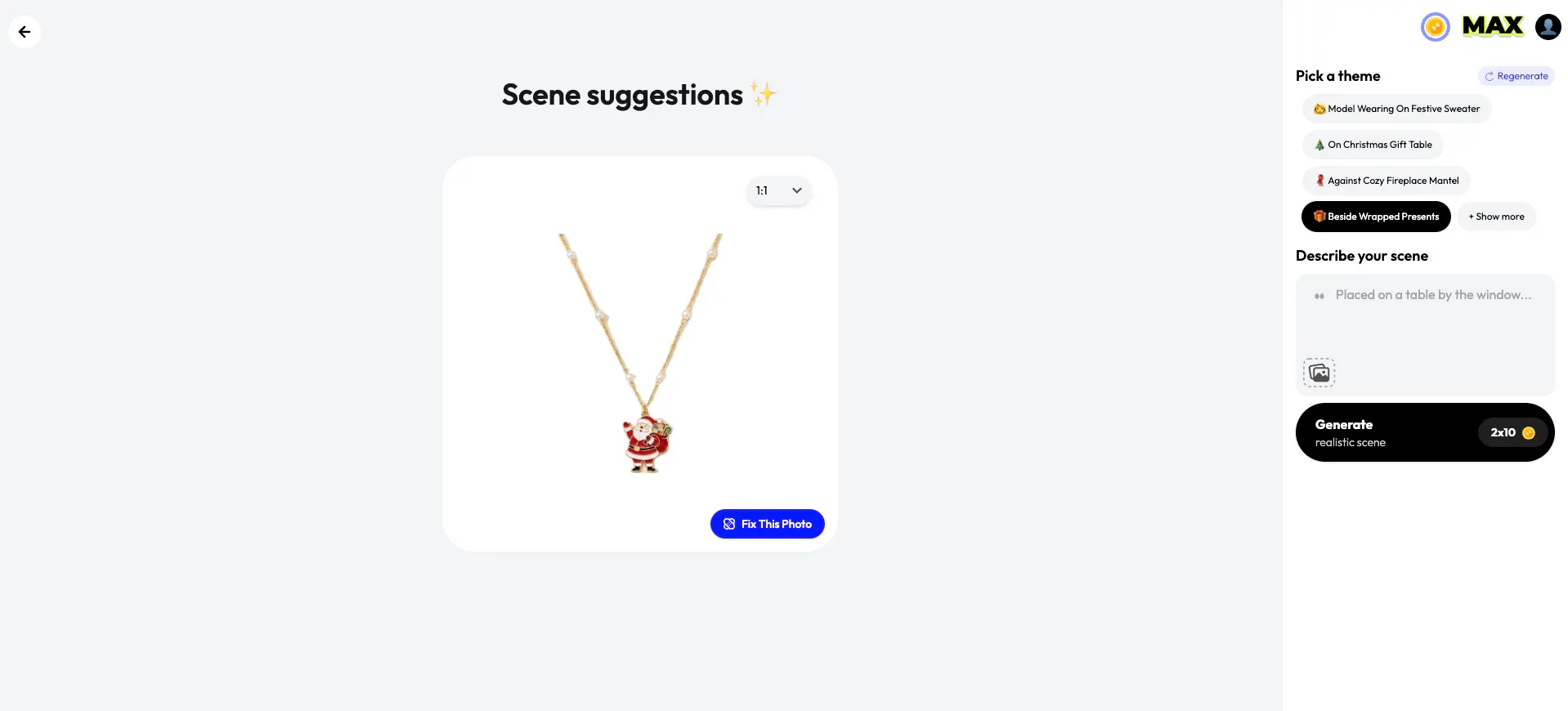
To make your tasks easier, Blend already provides a list of themes curated for the product you upload. If you want to be more creative, you can even describe your own scene. In this case, we choose the theme "Beside Wrapped Presents."
3) Click Generate scenes. This is gonna consume 20 credits, but it will give you a highly realistic scene. Let AI brew its magic.

And there you go. I honestly bet a professional shoot won't deliver such high-quality results until you decide to go all out and hire magazine-cover photographers...
4) and you can still customise it thoroughly with your vibe. Let a model wear it, and adjust lighting, props, and background as you prefer; you can even create a short product shot video of it—insane, right?
5) and when fully satisfied, just export, download, and use it wherever you want.
Just do the process for your entire catalog.
Have a look at some more iterations. See, the difference is so visually evident.

Check out this elegant purse, which is shown being carried by that lady. I mean, who is gonna say this is an AI-generated pic?
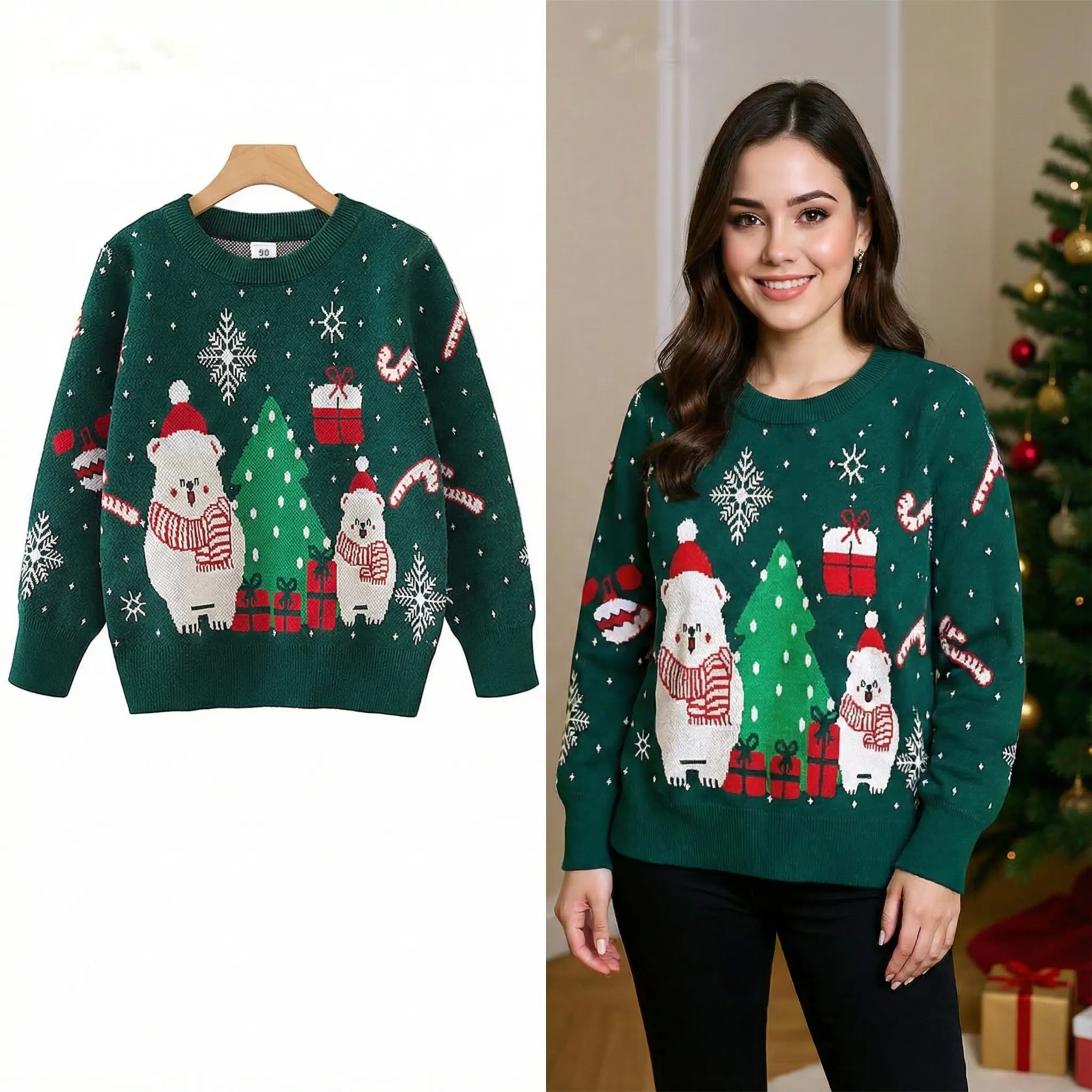
Similarly, have a look at this sweater, which looks so good on the model in the after photo.
And mind it, this is just one of the features that you can use at Blend. You can create a logo, change backgrounds, an AI Model, whatever you need for your brand.
Conclusion
So this Christmas, forget the pressure of trying to book studios, source props, or recreate perfect festive setups. With Blend, you can produce premium, holiday-ready catalog images in minutes — no heavy budgets, no complicated logistics. All you need is a simple workflow, and Blend handles the creative magic. Make your brand feel festive, elevated, and ready to compete. Let Blend be your Santa this season and help you close the year on a high note.
Ready to create your Christmas catalog? Try Blend now at:
https://app.blendnow.com